


Data Room Access: How Permissions and Access Levels Actually Work
Setting up data room access sounds simple until you’re actually staring at a folder tree with forty subfolders and a growing list of bidders, advisors, and internal reviewers who all need slightly different things. Get it wrong in one direction and you’ve over-shared sensitive material with people who shouldn’t see it. Get it wrong in the other direction and you’ve locked out reviewers who need information to do their job, slowing the whole process down.
This guide covers how data room access actually works in practice — the permission levels available, the common user roles, and how to structure access correctly without either extreme.
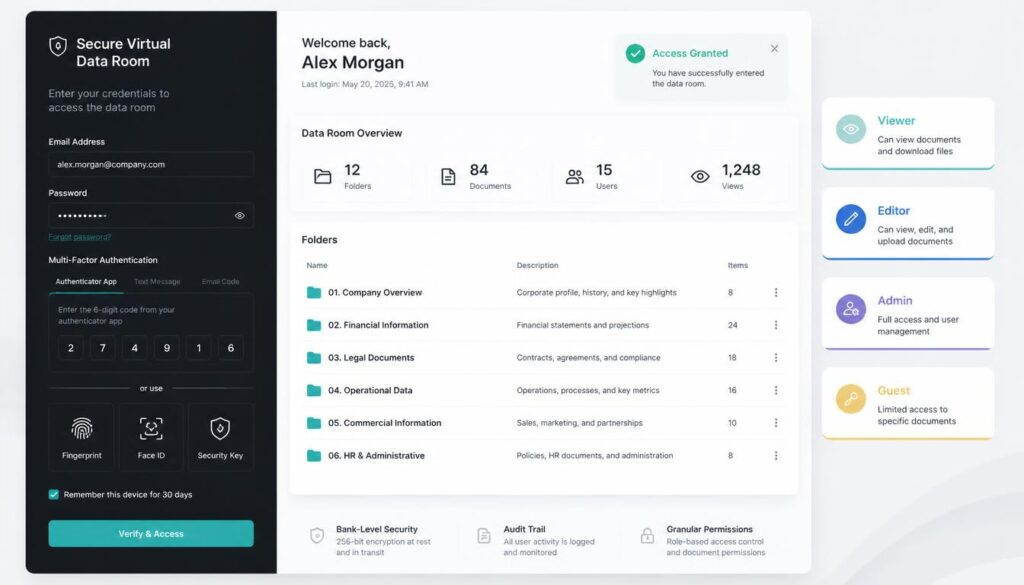
The Core Access Levels
Most virtual data rooms offer a spectrum of access levels that can be applied at the folder or individual document level, rather than a single all-or-nothing setting.
No access. The default for anyone not explicitly granted permission — folders and documents simply don’t appear for that user.
View-only. The user can open and read a document within the platform but cannot download, print, or forward it. This is the standard setting for the most sensitive material during early-stage review.
View and download. The user can save a copy of the document to their own device. This carries more risk than view-only, since once downloaded, a file is outside the data room’s direct control — though watermarking still helps trace the source if it’s later shared inappropriately.
View, download, and print. The broadest standard access level, typically reserved for later-stage reviewers or internal team members who need full working access to the material.
Edit access. Rare in data rooms outside of collaborative document preparation, since most data room use cases involve one-way disclosure rather than joint editing — but relevant for certain workflows, particularly during final document negotiation.
Admin access. Full control over the room itself — adding and removing users, adjusting permissions, uploading and reorganizing documents. Typically restricted to a small internal group managing the room.
Common Data Room User Roles
Room administrator. Manages the overall structure, controls user access, and typically has visibility into all activity across the room. Usually the seller’s internal deal lead or legal counsel.
Internal deal team. Broad access across most or all of the room, since they need full visibility to manage the process and respond to reviewer questions.
External advisors (legal, financial, tax). Access tailored to their specific workstream — legal counsel typically needs full access to legal documentation but not necessarily deep access to unrelated commercial material.
Bidders or investors. Access that expands as they progress through the process, starting narrower and broadening as they move from initial interest to serious, advanced-stage review.
Auditors. Access scoped specifically to the financial and compliance documentation relevant to their review, generally without visibility into unrelated commercial or strategic material.
Structuring Access Without Over- or Under-Sharing
Use Staged Access for External Parties
Rather than granting full access to every external party from day one, many data room administrators use a staged approach: broader financial and commercial information available early, with more sensitive material — detailed IP documentation, specific customer contracts, litigation history — released only as a bidder or investor progresses further into the process.
This protects sensitive information from parties who ultimately don’t advance, while avoiding the friction of restricting access from serious, advanced-stage reviewers who genuinely need full visibility.
Build Permission Groups, Not Individual Settings
Configuring access one person at a time becomes unmanageable quickly, particularly in auction-style processes with multiple bidders. Setting up permission groups — “Bidder Group A,” “Legal Advisors,” “Internal Team” — and assigning new users to an existing group is far more efficient than manually configuring permissions for every individual.
Restrict Sensitive Categories Independently
Certain document categories — personal employee data, detailed IP filings, litigation records — often warrant tighter restriction than the rest of the room, regardless of a reviewer’s general access tier. Treating these categories as their own permission layer, rather than lumping them into general folder-level access, reduces the risk of accidental over-sharing.
Review Access Periodically, Not Just at Setup
Deal dynamics shift — bidders drop out, advisors change, internal team composition evolves. Data room access should be reviewed periodically throughout the process, not configured once at the start and left unchanged. A bidder who’s withdrawn from the process but retains active access represents an unnecessary, avoidable exposure.
Revoke Access Promptly When It’s No Longer Needed
Once a deal closes, or once a specific reviewer’s involvement ends, access should be revoked immediately rather than left active by default. Platforms that support remote document revocation extend this further, allowing previously downloaded files to be rendered inaccessible even after they’ve left the platform.
Common Data Room Access Mistakes
Granting blanket access for administrative convenience. It’s tempting to give everyone broad access simply because managing granular permissions takes more setup time — but this significantly increases exposure for very little practical benefit in most cases.
Forgetting to update access as roles change. An advisor who moves off a deal, or a bidder who drops out, frequently retains access far longer than intended simply because no one remembered to revoke it.
Applying the same access level to everyone in a category. Not every “bidder” or “advisor” needs identical access — tailoring permissions to what a specific party actually needs to do their job, rather than defaulting to a uniform tier, reduces unnecessary exposure.
Not auditing access before closing. Before a deal closes, it’s worth reviewing exactly who has access to what, and confirming that anyone who shouldn’t retain post-closing access has been removed.
A Practical Access-Setup Checklist
- Identify the distinct categories of user who need access (internal team, advisors, bidders, auditors)
- Build permission groups for each category rather than configuring access individually
- Identify sensitive document categories that need independent, tighter restriction
- Decide on a staged access plan for external parties, if the deal structure warrants it
- Set a recurring reminder to review access periodically throughout the deal
- Confirm a clear process for revoking access promptly when a reviewer’s involvement ends
Final Thoughts
Data room access control is less about finding the single “correct” permission setting and more about structuring a system that scales sensibly as a deal grows — more reviewers, more documents, shifting roles — without requiring constant manual reconfiguration. Getting the structure right at the outset, using staged access and permission groups rather than ad hoc individual settings, saves considerable administrative effort and meaningfully reduces the risk of over-sharing sensitive material.
Related reading: For the broader security features that support strong access control, see our guide to secure data room essentials, and for how access typically evolves during a transaction, our guide to virtual data rooms for due diligence.
Related Reading
Virtual Data Room Software: Key Features and How to Choose the Ideal Platform
Virtual Data Rooms for Due Diligence: A Complete Process Guide
The Definitive Guide to Virtual Data Rooms (VDRs)
